

Anker Prime A83B5 Thunderbolt 5 (14-in-1): The Ultimate Port Expansion Solution for Pc, Laptops
Modern laptops are getting faster and sleeker, but there’s one thing we’ve all noticed: the number of ports keeps shrinking. And the moment you need to connect to multiple monitors, transfer large files, plug in an SSD, or use a wired network, the limitations hit hard.
You’ve probably been there too.
A video call that keeps dropping because Wi-Fi is unstable.
A tight deadline where you need to import 50GB of footage, but your USB port crawls.
A presentation that requires two external displays — yet your laptop only has one HDMI port.
These small-but-frequent frustrations break our workflow more than we realize. No matter how powerful a laptop is, it simply cannot function at peak performance without the right connectivity.
That’s why docking stations have become essential for a modern desk setup.
But not all docks are created equal. Some lack power. Some aren’t stable. Many struggle with multi-monitor workflows. And only a handful are truly built for professional use.
This is where Anker Prime A83B5 Thunderbolt 5 Docking Station (14-in-1) stands out — designed for users who want performance, speed, stability, and long-term reliability.
Powerful Laptops, Fewer Ports
Most users face the same set of issues:
Only 1–2 USB-C ports remaining on premium laptops.
No Ethernet port → unstable online meetings.
Multi-monitor support is limited.
Slow USB speeds → slow SSD workflows.
Too many adapters → messy desk, inconsistent experience.
The problem isn’t processing power.
The problem is I/O capability — the laptop simply cannot connect to everything we need.
We Don’t Just Need More Ports — We Need Stronger, Faster, More Stable Ports
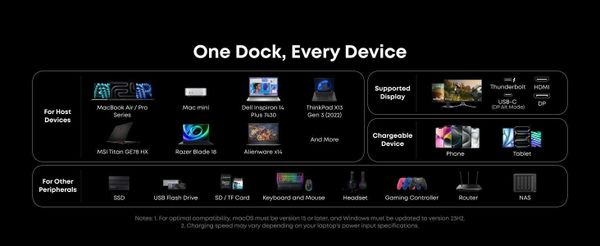
Most consumer docking stations add more ports, but don’t fix the real bottlenecks:
Low bandwidth → SSDs are slow.
Weak multi-monitor support → not suitable for creative work.
Weak power delivery → laptop battery still drains.
Instability when running for long hours.
If you work in design, editing, coding, content creation, or any multi-screen workflow, these bottlenecks slow everything down.
This is why Thunderbolt 5 — and the A83B5 — changes the game.
Anker Prime A83B5 Thunderbolt 5 Docking Station (14-in-1)
👉 More detail about Anker Prime A83B5 Thunderbolt 5 Docking Station (14-in-1)
As one of the very first Thunderbolt 5 docks on the market, the A83B5 brings:
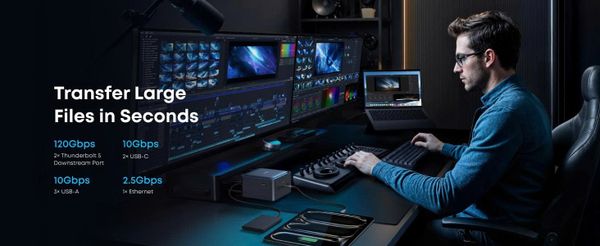
Up to 120Gbps bandwidth (3× TB4)
Superior multi-monitor support
Ultra-fast data transfer
Stable, workstation-grade performance
A balanced selection of 14 essential ports
Anker designed this dock specifically for high-performance workflows: video editing, 3D work, programming, data analysis, and multi-monitor office setups.
Full Specifications (14-in-1) — Accurate & Verified
👉 More detail about Anker Prime A83B5 Thunderbolt 5 Docking Station (14-in-1)
Based on Anker’s official technical documentation, the Prime A83B5 includes:
Thunderbolt / USB-C Ports
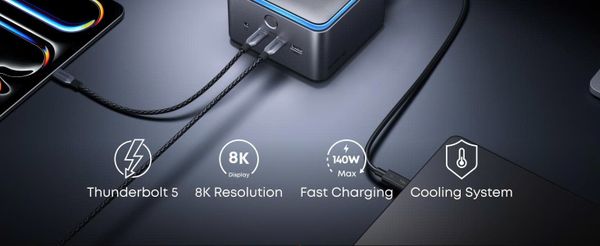
1 × Thunderbolt 5 upstream (power + data)
2 × Thunderbolt 5 downstream
USB-C 10Gbps × multiple ports
Display Ports
2 × HDMI supporting advanced 4K/8K output
Multi-monitor support varies by laptop model (TB5-ready laptops get the best results)
Additional Ports
1 × 2.5Gbps Ethernet
High-speed USB-A ports
SD + microSD UHS-II
High-output Power Delivery for charging laptops
→ A complete setup for nearly any professional workflow.
Key Strengths
✔ Thunderbolt 5 performance is on another level
120Gbps bandwidth eliminates bottlenecks in SSD transfers, multi-monitor setups, and data-heavy workflows.
✔ Robust 4K/8K multi-display support
Suitable for creators, coders, analysts, streamers, and digital workers.
✔ A well-balanced 14-port configuration
Enough ports for even the heaviest setups — without being cluttered.
✔ 2.5Gbps Ethernet for rock-solid network stability
Essential for remote work, large uploads, and video calls.
✔ Anker reliability: durable, stable, long-lasting
A brand known for excellent build quality and consistent performance.
Limitations to Keep in Mind
Pricing is premium — expected for Thunderbolt 5 devices.
To unlock full performance, a TB5 or TB4 laptop is recommended.
Overkill for users who only need basic connectivity.
Real Workflow Experience: One Cable, Entire Setup Activated
Imagine your workspace:
Plug one single Thunderbolt 5 cable into your laptop.
Instantly, 2–3 external monitors light up.
Your SSD, keyboard, mouse, microphone, speakers, SD card, and LAN are all connected.
And your laptop charges automatically through the dock.
No cable swapping, no adapter juggling, no interruptions.
Just plug in → start working.
It feels like turning a laptop into a full desktop workstation — instantly.
How It Compares to Two Top Competitors
To help you choose based on real needs, here’s how the A83B5 stands next to two well-known high-end docking stations.
CalDigit TS4 (18-in-1 – Thunderbolt 4)
👉 More detail about CalDigit TS4 (18-in-1 – Thunderbolt 4)
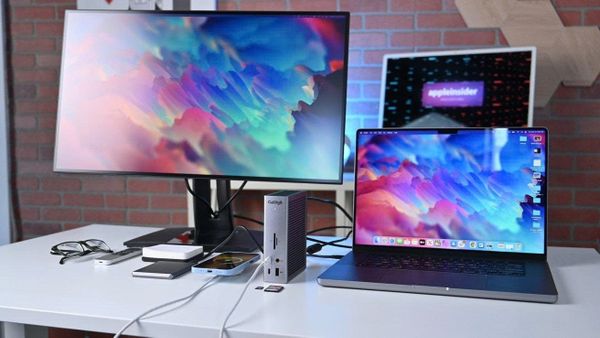
The CalDigit TS4 is a legend in the creative industry.
Pros
A massive 18 ports, more than most docks.
Exceptional long-term stability.
Widely favored by editors and creative professionals.
Cons
Only Thunderbolt 4 → 40Gbps vs TB5’s 120Gbps.
Runs warmer under heavy load.
Larger and bulkier.
Best for
Users who want as many ports as possible and don’t need TB5.
OWC Thunderbolt Go Dock (11-in-1 – Thunderbolt 4)
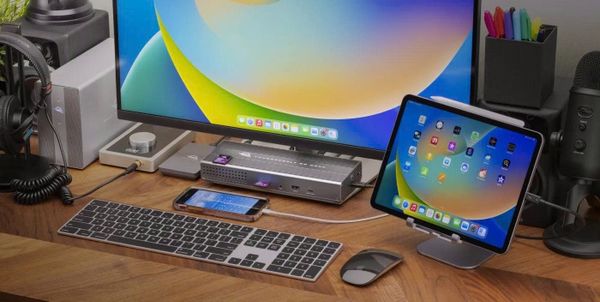
👉 More detail about OWC Thunderbolt Go Dock (11-in-1 – Thunderbolt 4)
OWC is highly respected by Mac users.
Pros
Compact and portable.
Highly stable with macOS.
Includes UHS-II for photographers.
Cons
Limited by Thunderbolt 4 bandwidth.
Fewer ports than the Anker A83B5.
Not ideal for multi-4K workflows.
Best for
Mobile Mac users who want a reliable, portable dock.
Quick Comparison Table
| Feature | Anker A83B5 TB5 | CalDigit TS4 (TB4) | OWC Go Dock (TB4) |
|---|---|---|---|
| Technology | Thunderbolt 5 | Thunderbolt 4 | Thunderbolt 4 |
| Bandwidth | 120Gbps | 40Gbps | 40Gbps |
| Number of Ports | 14 | 18 | 11 |
| Multi-display Output | 4K/8K strong | 6K / dual 4K | dual 4K |
| Priority | Performance & future-proof | Maximum connectivity | Portability |
| Best Use Case | Heavy workflows | Fixed setups | Mobile Mac users |
Which Dock Should You Choose?
Choose the Anker Prime A83B5 Thunderbolt 5 if you:
Want the fastest, strongest, most stable dock available today.
Work with multiple high-resolution monitors.
Handle large files or heavy workloads.
Want a “future-proof” solution for the next 3–5 years.
Choose the CalDigit TS4 if you:
Need the maximum number of ports possible.
Work mostly from a fixed desk setup.
Don’t require Thunderbolt 5 speeds.
Choose the OWC Thunderbolt Go Dock if you:
Use a MacBook and prefer something light and portable.
Don’t need high-performance multi-display support.
Final Verdict: A Top-Tier Dock for Modern Professionals
Powered by the next-generation Thunderbolt 5 standard, the Anker Prime A83B5 (14-in-1) delivers:
Outstanding bandwidth
Strong multi-display capability
A practical port layout
Stability and long-term value
Power and speed suitable for heavy professional workflows
It doesn’t just expand ports — it expands the true potential of your laptop.
For users who want the best mix of performance, connectivity, and durability, this is easily one of the most compelling docking stations available today.
(Some links on our site may be affiliate, meaning we may earn a small commission at no extra cost to you.)
Subscribe now !
Be the first to explore smart tech ideas, AI trends, and practical tools – all sent straight to your inbox from IkigaiTeck Hub

IkigaiTeck.io is an independent tech publication sharing practical insights on AI, automation, and digital tools.